.webp)



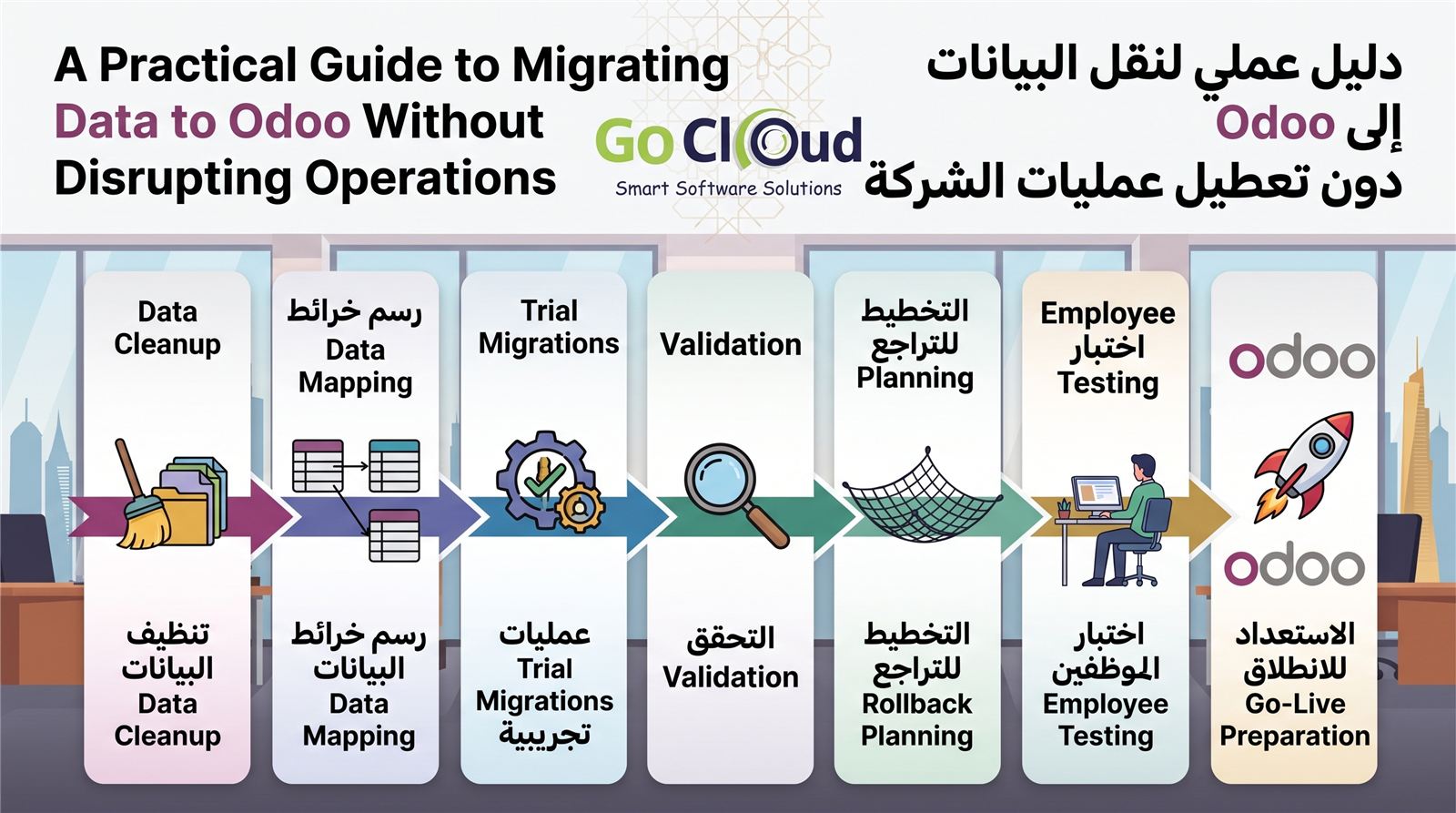
A successful Odoo implementation depends on more than configuring the new platform. If incomplete, duplicated, or inaccurate data enters the system, users can lose trust in it from day one. Data migration should therefore be managed as a structured business project, not a copy-and-paste task left until the end.
The goal is not to move everything from the legacy system. It is to move the correct data the business needs, in the right structure, with clear evidence that it is complete and accurate, and without unplanned operational downtime.
Why Data Migration Projects Fail
Problems are common when teams start too late, no owner is assigned to each data set, records are moved before cleansing, or the project relies on a single import test before launch. Differences in codes, currencies, units of measure, and mandatory fields can also create defects that only appear later in reports or transactions.
This is not only a technical issue. Business departments must approve customer, supplier, inventory, and accounting balances because a technical team cannot decide which commercial record is correct on their behalf.
Phase 1: Define Scope and Ownership
Begin with a clear list of what will move and what will remain in a searchable archive. Common priorities include:
- Customers, suppliers, contact details, and tax information.
- Products, services, categories, units of measure, and price lists.
- Opening balances for accounts, customers, and suppliers.
- Inventory by warehouse, location, lot, or serial number.
- Open orders or contracts that will continue after go-live.
- Employees, assets, and other master data required by the agreed scope.
Assign a business owner to every data set and a technical owner for extraction, transformation, and loading. Define the cutover date, change-freeze period, and approval process before execution begins.
Phase 2: Profile and Clean the Data
Extract the data early and create a quality report showing duplicates, missing fields, invalid values, and conflicting codes. Do not turn Odoo into a repository for every defect in the legacy system.
- Merge duplicate customers and suppliers according to an approved rule.
- Standardize phone numbers, addresses, and tax identifiers.
- Review inactive products and decide what should be archived.
- Standardize units of measure, currencies, and payment terms.
- Separate master data from transactions and balances.
- Keep an unchanged raw copy of every extraction for audit purposes.
Document cleansing decisions, especially when a code changes or two records are merged, so the difference between source and result remains traceable.
Phase 3: Build the Data Mapping
A migration map links each source field to its destination in Odoo and defines transformation rules, defaults, and mandatory values. Examples include converting country names into codes, linking a customer code to a partner record, or mapping a legacy unit of measure to an approved one.
The map should also define load order because records depend on one another. Categories and units must exist before products, customers before receivable balances, and accounts and taxes before accounting entries.
Phase 4: Run Repeated Trial Migrations
Do not wait for go-live. Run an early test with a small sample to expose structural issues, followed by a complete migration in a test environment. Record the duration, errors, and resolutions for every step, then repeat after corrections.
A trial migration cycle should include:
- Extract a date-stamped source snapshot.
- Run repeatable cleansing and transformation rules.
- Load records in the approved sequence.
- Review rejected records and resolve their causes.
- Perform count, balance, and sample tests.
- Obtain approval from the relevant business data owners.
How Do You Prove the Data Is Correct?
A successful import message is not proof of a successful migration. Use several levels of reconciliation:
- Record counts: compare customers, products, and open records between source and target.
- Value totals: compare receivables, payables, general ledger balances, and inventory quantities and values.
- Sample tracing: follow selected records from the source into Odoo, including fields and relationships.
- Process testing: complete sales, purchasing, receipt, delivery, and payment scenarios with migrated data.
- Report review: confirm that agreed financial and operational reports reconcile.
Define acceptable tolerance and approval authority in advance. For financial and inventory balances, every difference should be explained rather than hidden inside a general success percentage.
Phase 5: Cutover and Go-Live
The cutover plan describes what will happen by the hour in the final days: stopping entry in the old system, final extraction, transformation, loading, reconciliation, and authorization to begin work. Choose a lower-volume window, but do not use a long shutdown as a substitute for rehearsal and training.
Downtime can be reduced by loading master data in advance, then moving final changes and balances during the cutover window. Users need clear communication about the last time to work in the old system and the first time to enter transactions in Odoo.
A Rollback Plan Does Not Mean You Expect Failure
A rollback plan protects continuity if go-live criteria are not met. It should define the decision point, authorized people, method for reopening the old system, and treatment of transactions made during the window. Verified backups and a tested restoration procedure are essential.
Do not go live merely because the planned time has arrived. Use an acceptance checklist covering balances, critical processes, integrations, performance, and support readiness.
After Go-Live: Monitor and Support
Provide a focused support team during the first days and record issues by priority and owner. Review balances, integrated transactions, and reports daily, and prevent undocumented fixes that alter data without an audit trail. Once operations stabilize, document the outcome and close migration files with approval evidence.
Conclusion: Safe Migration Is Repeatable and Measurable
The strongest Odoo migration starts early, has clear scope and ownership, cleans data before loading, rehearses the process, and reconciles results against provable figures. This approach allows the organization to move confidently while preserving continuity and decision quality.
GoCloud helps organizations plan, execute, and validate Odoo data migration as part of a complete go-live plan covering users, operations, and integrations, not only import files.